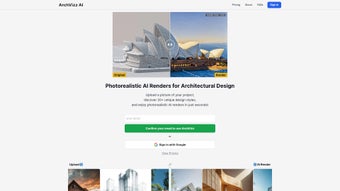

Download ArchVizz – Instant AI Renders for Architectural Designs
Overview
ArchVizz is a cloud‑based, AI‑driven rendering engine purpose‑built for architects, interior designers, and real‑estate marketers who need photorealistic visualisations in a fraction of the time required by conventional software. By uploading a simple 2‑D plan, a low‑poly 3‑D model, or even a hand‑drawn sketch from popular CAD tools such as AutoCAD, Blender, or SketchUp, the platform instantly interprets geometry, material cues, and lighting direction. Within roughly 15 seconds, ArchVizz generates a high‑resolution image that can be exported in 4K PNG or JPEG, ready for client presentations, marketing brochures, or virtual tours.
The engine offers more than 20 distinct design styles, ranging from sleek modern minimalism to historically rich motifs like Ancient Egyptian, Greek Classical, Roman Imperial, and Islamic Ottoman, allowing professionals to explore cultural narratives without extensive research or additional plug‑ins.
The primary advantage of ArchVizz lies in its combination of speed, simplicity, and artistic freedom. Traditional rendering pipelines often require hours of manual texture mapping, lighting set‑up, and post‑production tweaks.
ArchVizz eliminates these steps through a trained neural network that learns from thousands of real‑world photographs and architectural renders. Users can experiment with multiple visual themes in a single session, compare outcomes side‑by‑side, and instantly iterate based on client feedback. Security is baked into the service: all uploads travel over HTTPS, are encrypted at rest, and are automatically purged after 24 hours, ensuring proprietary designs stay confidential.
Whether you are a solo freelancer needing a cost‑effective visualisation tool or a large studio looking to accelerate proposal cycles, ArchVizz provides a secure, scalable, and cost‑efficient solution that democratises high‑end rendering for the entire design community.
Key Features that Set ArchVizz Apart
- Instant AI Rendering – Photorealistic results in ~15 seconds.
- Broad Style Library – Over 20 design styles, including modern, minimalist, and culturally inspired themes such as Ancient Egyptian, Greek Classical, Roman Imperial, and Islamic Ottoman.
- Seamless Integration – Supports file uploads from AutoCAD, Blender, SketchUp, and common image formats (JPG, PNG, TIFF).
- One‑Click Export – High‑resolution PNG or JPEG output ready for presentations, marketing material, or web use.
- Cloud‑Based Processing – No heavy GPU required on the user’s machine; all AI computation occurs securely in the cloud.
- Version Control – Automatic saving of previous render iterations for easy comparison.
- Secure Data Handling – Encrypted file transfer and temporary storage with auto‑deletion after 24 hours.
- Multi‑Project Dashboard – Organise, tag, and retrieve renders across different client projects.
- Regular Updates – Continuous improvement of AI models, new style additions, and performance enhancements.
- Free Trial & Flexible Pricing – Start with a no‑cost trial; subscription plans available for individuals, studios, and enterprises.
Each feature addresses a specific pain point that architects and designers encounter daily. The instant rendering engine eliminates the waiting time traditionally associated with ray‑tracing and global illumination, enabling designers to iterate rapidly and present multiple concepts within a single meeting. The diverse style library empowers creatives to explore cultural references that would otherwise require specialised knowledge or extensive research.
For example, a heritage hotel project can instantly preview a “Roman Imperial” façade, visualising how marble columns, arches, and ornamental details would integrate with existing structures.
Cloud‑based processing means that even a modest‑spec laptop can produce studio‑grade images, making ArchVizz inclusive for freelancers and small firms that cannot afford high‑end workstations. Security is another cornerstone: all files are encrypted during upload, processed on isolated servers, and automatically purged after a short retention period, aligning with industry standards for intellectual‑property protection.
Version control tracks each rendering iteration, allowing users to revert to previous styles or compare lighting and material perception across variants. Together, these capabilities create a holistic environment where speed, creativity, and security coexist, positioning ArchVizz as a forward‑thinking solution in the competitive landscape of architectural visualisation tools.
Installation, Usage Instructions, and Compatibility
Getting Started – Simple Access, No Installation
ArchVizz is a web‑based application, so there is no traditional software download or installation required. Users simply navigate to the official website, click “Sign Up,” and complete a brief registration process (email, password, verification link). Within two minutes the user lands on a clean dashboard where the “Upload Project” button awaits the first file. Because the platform runs entirely in modern browsers, the onboarding experience is uniform across devices and operating systems.
Step‑by‑Step Rendering Workflow
- Prepare Your File: Export your design from AutoCAD, Blender, or SketchUp as a high‑resolution PNG, JPG, or TIFF. Ensure key architectural elements are clearly visible.
- Upload: Drag and drop the file onto the upload area or use the “Browse” button. The system instantly scans the image and presents a preview thumbnail.
- Select a Style: Choose from the style gallery. Hover over each style to see a short description and a sample thumbnail. Cultural styles include contextual notes to guide selection.
- Render: Click “Generate Render.” The AI engine processes the request in the cloud; progress is shown via a percentage bar. Typical render time is about 15 seconds.
- Review & Download: A high‑resolution preview appears with “Before” and “After” toggles. Add notes, choose PNG or JPEG, and click “Download.”
- Save to Dashboard: The render is automatically stored in your project folder, where you can tag it with client names, project codes, or design phases for future reference.
Compatibility – Operating Systems and Devices
Because ArchVizz runs entirely in a modern web browser, it is compatible with virtually any operating system that supports Chrome, Firefox, Edge, or Safari. This includes Windows 10/11, macOS 10.15+ (Catalina and later), Linux distributions with a recent browser, as well as mobile platforms like Android 9+ and iOS 13+. The responsive UI adapts to tablets and smartphones, allowing field agents to generate quick visual references while on construction sites. The only technical requirement is a stable internet connection (minimum 5 Mbps recommended) to ensure smooth upload and download of large image files.
For organisations with strict IT policies, ArchVizz also offers a private‑cloud deployment option. This variant can be installed on internal servers (Windows Server or Linux) and accessed via a corporate VPN, guaranteeing that all rendering data remains within the company’s network perimeter. The private‑cloud version mirrors the public SaaS feature set, including the style library and AI engine, while providing additional control over data residency and compliance with regulations such as GDPR or CCPA.
Pros, Cons, FAQ, and Final Recommendation
Pros
- Lightning‑fast rendering (~15 seconds) dramatically reduces project turnaround.
- Extensive style library, including rare cultural motifs, expands creative possibilities.
- No powerful GPU required; cloud processing works on low‑spec devices.
- Secure, encrypted file handling protects proprietary designs.
- Cross‑platform compatibility – works on Windows, macOS, Linux, Android, and iOS.
- Free trial and tiered pricing accommodate freelancers to large studios.
- Version control and dashboard organisation streamline project management.
Cons
- Requires an active internet connection; offline rendering not currently supported.
- Advanced lighting tweaks (e.g., custom HDRI environments) are limited compared to full‑featured 3D packages.
- Subscription model may be less appealing for one‑time users after the trial period.
- Style library updates are periodic; emerging design trends may take time to appear.
FAQ – Answers to Common Queries
How secure is my uploaded design data?
All files are transferred over HTTPS, encrypted at rest, and automatically deleted from the server after 24 hours. Enterprise users can opt for private‑cloud deployment to keep data entirely within their own network.
Can I use ArchVizz with other 3D software like Revit or Rhino?
Yes. While native integrations exist for AutoCAD, Blender, and SketchUp, you can export a 2‑D snapshot or rendered image from Revit, Rhino, or any other application as PNG/JPG/TIFF and upload it for AI rendering.
What resolution can I export?
Standard downloads are 4K (3840 × 2160 px) PNG or high‑quality JPEG. Higher resolutions (up to 8K) are available for premium subscribers and can be requested on a per‑project basis.
Is there a limit to how many renders I can generate per month?
The free trial includes 20 renders. Paid plans start at 200 renders per month, with enterprise tiers offering unlimited rendering and priority processing.
Do I need a powerful graphics card to use ArchVizz?
No. Because all AI calculations happen in the cloud, even modest laptops or tablets can produce photorealistic results. The only requirement is a stable internet connection.
Final Recommendation
ArchVizz bridges the gap between speed and artistic depth, delivering instantly generated, photorealistic renders that meet the high expectations of today’s architectural market. Its AI core removes the tedious setup of lights, textures, and camera angles, while the extensive style library empowers designers to experiment with culturally rich aesthetics that would otherwise require specialized research or additional software. The cloud‑first approach ensures that even small firms or solo practitioners can access studio‑grade visualisation without investing in expensive GPU hardware.
Security, cross‑platform compatibility, and a user‑friendly dashboard make ArchVizz a practical choice for both quick client presentations and large‑scale marketing campaigns. While the reliance on an internet connection and the subscription pricing model are considerations, the productivity gains and creative flexibility far outweigh these minor drawbacks. Whether you’re showcasing a modern loft, a historic renovation, or a boutique hotel with Ottoman influences, ArchVizz equips you with the tools to turn a simple CAD snapshot into a compelling visual story in seconds.
Ready to accelerate your design workflow and wow your clients with instant, high‑quality renders? Download ArchVizz now and start your free trial today. Experience the future of architectural visualisation – fast, secure, and beautifully diverse.



.png)



